Tuesday, 10 September 2013

jquery using Autocomplete TextBox asp.Database WebService Database

jquery using Autocomplete TextBox asp.Database WebService Database:

aspx:
<head runat="server">
   <title></title>
<link      href="http://ajax.googleapis.com/ajax/libs/jqueryui/1.8.1/themes/base/jquery-ui.css" rel="stylesheet" type="text/css"/>
<script type="text/javascript"  src="http://ajax.googleapis.com/ajax/libs/jquery/1.4.2/jquery.min.js"></script>
<script type="text/javascript" src="http://ajax.googleapis.com/ajax/libs/jqueryui/1.8.1/jquery-ui.min.js"></script>

//Text Box AutoComplete
    <script type="text/javascript">
        $(document).ready(function () {
            SearchText();
        });
//Function:
        function SearchText() {
//WebServices Pagename and TextBox Name


            $("[id$='txtSearchName']").autocomplete({
              source: function (request, response) {
               $.ajax({
                type: "POST",
                contentType: "application/json; charset=utf-8",
                url: "AutoComplete.asmx/GetName",
               data: "{'Name':'" +          document.getElementById('txtSearchName').value + "'}",
                dataType: "json",
                 success: function (data) {
                   response(data.d);
                        },
                        error: function (lstGetName) {
                            alert("Error");
                        }
                    });
                }
            });
        }
</script>
</head>
// TextBox
 <div  align="center">
           <asp:TextBox ID="txtSearchName" runat="server"></asp:TextBox>
           </div>
       

//Webservices
//AutoComplete.asmx

namespace Sample
{
 
/// <summary>
    /// Summary description for AutoComplete
    /// </summary>
    [WebService(Namespace = "http://tempuri.org/")]
    [WebServiceBinding(ConformsTo = WsiProfiles.BasicProfile1_1)]
    [System.ComponentModel.ToolboxItem(false)]
    // To allow this Web Service to be called from script, using ASP.NET AJAX, uncomment the following line. 
    [System.Web.Script.Services.ScriptService]
   
        
     public class AutoComplete : System.Web.Services.WebService
    {

        [WebMethod]
        public List<string> GetName(string Name)
        {
            SqlConnection Conn = new      
           SqlConnection(ConfigurationManager.AppSettings["Connection"]);
            SqlDataAdapter da = new SqlDataAdapter();
            DataSet ds = new DataSet();
            string Select;
            Select = "Select * From Employee Where EmpName Like'%"+Name+"%'";
            da = new SqlDataAdapter(Select, Conn);
            da.Fill(ds);
            List<string> lstGetName = new List<string>();
            foreach (DataRow dr in ds.Tables[0].Rows)
            {
                lstGetName.Add(dr["EmpName"].ToString());
            }
            return lstGetName;
        }
    }
}


Thursday, 25 July 2013

repeater nested repeater in asp.net Nested repeater

repeater nested repeater in asp.net Nested repeater :

DataBase SQL:

CREATE TABLE [dbo].[Employee](
[ID] [int] PRIMARY KEY IDENTITY(1,1) NOT NULL,
[EmpName] [varchar](100) NULL,
[EmpSalary] [varchar](100) NULL,
[Address] [varchar](100) NULL
)

CREATE TABLE [dbo].[EmpComment](
[CommentID] [int] Primary Key IDENTITY(1,1) NOT NULL,
[Emp_ComID] [int] NULL,
[CommentDescription] [varchar](max) NULL,
[CommentDate] [datetime] NULL
)
              -------------------------------------

CSS Style:

<style type="text/css">
        .lbl
        {
            font-family: Verdana;
            font-size: 12px;
            margin-left: 20px;
        }
        .Pad
        {
          padding: 10px,2px,0px,0px
        }
        .tdComment
         {
          border: 1px dashed #52A8FF
          background-color: White;
         width: 500px; padding: 5px;
                }
    </style>

aspx :


  <div>
   <div style="float: left">
       <asp:Repeater ID="outerRep" runat="server"                                   
                     OnItemDataBound="outerRep_ItemDataBound"
                     OnItemCommand="outerRep_ItemCommand">
    <ItemTemplate>
       <table style="background-color: Aqua; width: 600px">
          <tr>
            <td style="height: 90px; width: 20%; border-right: 3px solid silver"
              align="center" valign="center">
                <div style="margin-bottom: 0px; margin-left: 10px; margin-right: 10px;">
                     <img width="120px" height="100px" src="Images/1374710102_128 (20).png" />
               </div>
       </td>
       <td>
      <table>
       <tr>
         <td class="pad">
          <asp:Label ID="lblName" runat="server" CssClass="lbl" Text="Name :"></asp:Label>
          <asp:Label ID="Label3" runat="server" CssClass="lbl"
          Text='<%#Eval("EmpName")%>'></asp:Label>
      </td>
      </tr>
        <td class="pad">
              <asp:Label ID="Label4" runat="server" CssClass="lbl" Text="Salary :"></asp:Labe>                   <asp:Label ID="Label5" runat="server" CssClass="lbl" 
               Text='<%#Eval("EmpSalary")%>'></asp:Label>
          </td>
          </tr>
          <td class="pad">
            <asp:Label ID="Label6" runat="server" CssClass="lbl" Text="Address :"></asp:Label>
            asp:Label ID="Label7" runat="server" CssClass="lbl" 
               Text='<%#Eval("Address")%>'></asp:Label>
             </td>
             </tr>
         </table>
            </td> </tr> 
         </table>
          <table style="background-color: Aqua; width: 600px; padding: 10px">
Nested Repeater :
          <asp:Repeater ID="innerRep" runat="server">
           <ItemTemplate>
             <tr>
             <td class="tdComment">
            <asp:Label Style="margin-left: 130px; font-size: 12px; color: #52A8FF" ID="Label2"
              runat="server" Text="Commented on:"></asp:Label>
             <asp:Label Style="font-size: 12px; color: #52A8FF" ID="Label1" runat="server"                           Text='<%# Eval("CommentDate")%>'></asp:Label>
             <br />
             <asp:Label ID="hlProductName" runat="server"              
                 Text='<%# Eval("CommentDescription")%>'></asp:Label>
              </td>
               </tr>
             </ItemTemplate>
             </asp:Repeater>
              </table>
              <table style="background-color: Aqua; width: 600px">
                 <tr>
                 <td>
               <asp:LinkButton ID="lnkComment" Style="color: Red; margin-left: 400px"                
                     runat="server"  CommandArgument='<%#Eval("ID")%>' 
                     CommandName="Comment">Comments</asp:LinkButton>
              </td>
              </tr>
              <tr>
             <td>
           <asp:TextBox ID="txtRptComment" Style="margin-left: 30px" runat="server" 
             TextMode="MultiLine" Width="350px" Height="80px" Visible="false">
         </asp:TextBox>
            <br />
           <asp:LinkButton Style="margin: 75px" ID="lnlCmtSubmit" runat="server" Visible="false"
              CommandArgument='<%#Eval("ID")%>'                
                  CommandName="CmtSubmit">Submit</asp:LinkButton>
          <asp:LinkButton ID="lnkCancel" CausesValidation="false" runat="server" Visible="false"                       CommandArgument='<%#Eval("ID")%>'             
                 CommandName="CmtCancel">Cancel</asp:LinkButton>
             </td> </tr> </table>
                    <br />
                    <br />
                </ItemTemplate>
            </asp:Repeater>
        </div>
    </div>
                 ----------------------------------------------

aspx:CS


     protected void Page_Load(object sender, EventArgs e)
      {
         if (!IsPostBack)
           {
                BindData();
            }
       }
       
        protected void outerRep_ItemDataBound(object sender, RepeaterItemEventArgs e)
        {
            if (e.Item.ItemType == ListItemType.Item &&
            e.Item.ItemType == ListItemType.AlternatingItem)
                return;
            DataRowView drv = e.Item.DataItem as DataRowView;
            Repeater innerRep = e.Item.FindControl("innerRep") as Repeater;
Inner Repeater:
            innerRep.DataSource = drv.CreateChildView("CategoriesRelation");
            innerRep.DataBind();

            LinkButton lnkCom = (LinkButton)e.Item.FindControl("lnkComment");
            LinkButton lnkComSub = (LinkButton)e.Item.FindControl("lnlCmtSubmit");
            LinkButton lnkComCan = (LinkButton)e.Item.FindControl("lnkCancel");
            TextBox txtCom = (TextBox)e.Item.FindControl("txtRptComment");
        }

        public void BindData()
        {
            string Select;
            Select = "";
//Select Record
            da = new SqlDataAdapter("SELECT  * FROM Employee ORDER BY ID Desc;SELECT *                         FROM EmpComment EmpCom INNER JOIN Employee Emp ON      
                  Emp.ID=EmpCom.Emp_ComID ORDER BY EmpCom.Emp_ComID DESC", Conn);
            DataSet ds2 = new DataSet();
            da.Fill(ds2);
                  ds2.Relations.Add(new DataRelation("CategoriesRelation",                  
                     ds2.Tables[0].Columns["ID"],
                     ds2.Tables[1].Columns["Emp_ComID"]));
                     outerRep.DataSource = ds2.Tables[0];
                     outerRep.DataBind();

        }
        protected void outerRep_ItemCommand(object source, RepeaterCommandEventArgs e)
        {
            LinkButton lnkCom = (LinkButton)e.Item.FindControl("lnkComment");
            LinkButton lnkComSub = (LinkButton)e.Item.FindControl("lnlCmtSubmit");
            LinkButton lnkComCan = (LinkButton)e.Item.FindControl("lnkCancel");
            TextBox txtCom = (TextBox)e.Item.FindControl("txtRptComment");
Link Button CommantName and Command Argument:
            if (e.CommandName == "Comment")
            {
                txtCom.Visible = true;
                lnkComSub.Visible = true;
                lnkComCan.Visible = true;
            }
            if (e.CommandName == "CmtSubmit")
            {
                string Insert;
//iNSERT Record
                Insert = "Insert Into          
                 EmpComment(Emp_ComID,CommentDate,CommentDescription)Values
                ('"+e.CommandArgument.ToString()+"',getdate(),'" + txtCom.Text + "')";
                Cmd = new SqlCommand(Insert, Conn);
                Conn.Open();
                Cmd.ExecuteNonQuery();
                Conn.Close();
                BindData();
            }
            if (e.CommandName == "CmtCancel")
            {
//Cancel
    BindData();
            }
        }

Screen Nested Repeater :


//Comment


Wednesday, 3 July 2013

image name already exists,image name already check and image size check in asp.net

image name already exists,image name already check and image size check in asp.net :


aspx :


  <div> 
        <asp:Label ID="lblUploadImage" runat="server" 
                           Text="Image Upload:" ></asp:Label>

        <asp:FileUpload ID="imgUpload" runat="server" />

        <asp:Button ID="btnSave" runat="server"                  
                    Text="save" onclick="btnSave_Click" />

       <asp:Label ID="lblError" runat="server" Text="">        
        </asp:Label>
  </div>

aspx:cs :

protected void btnSave_Click(object sender, EventArgs e)
    {
        string f_name,Extension,ServerPath ,imgFileName;

        if (imgUpload.HasFile == true)
        {
            Extension = Path.GetExtension(imgUpload.PostedFile.FileName);
          
 //Image Format Check :

          if (Extension == ".JPG" || Extension == ".GIF" || Extension == ".jpg"  
                   ||  Extension == ".gif" || Extension == ".png")
            {

//Image Size Check : 

// -- 100KB =102400bytes 
                if (imgUpload.PostedFile.ContentLength < 102400)    // -- 100KB
                {   
                    f_name= Path.GetFileName(imgUpload.FileName);
                    ServerPath  = Server.MapPath(".");
                    imgFileName= path + "\\Image\\" + f_name;

//Image Name already Exists Check  : 
                    if (System.IO.File.Exists(imgFileName))
                    {
                        lblError.Text = "Image Name Already Use";
                        lblError.ForeColor = System.Drawing.Color.Red;
                        
                    }
                    else
                    {
//Image Upload  : 
                        imgUpload.SaveAs(imgFileName);
                        lblError.Text="Image Uploaded Sucessfully !!!";
                        
                     }
                }
                else
                {
                    lblError.Text = "Image Size allow only Max 100 KB";
                    lblError.ForeColor = System.Drawing.Color.Red;
                }
           
            }
            else
            {
                ClientScript.RegisterStartupScript(this.GetType(), "Success",
                "<script type='text/javascript'>alert('You must upload on image file with   
                               one of  following   Extensions::')      
                 </script>");

            }
       }
        
}

     ------------------------------------------------------------

--- Image Name already Use  : 


 --- Image Size  : 
 --- Image .jpg,.gif,.png only Allow .doc or xlsheet Not allowed  : 


Thursday, 27 June 2013

ajax reorder list database fill in c# drag the value assign value ajax control toolkit asp.net

ajax reorder list database fill in c# drag and drop assign value ajax control toolkit asp.net : aspx :


 <%@ Page Language="C#" AutoEventWireup="true" CodeFile="jQuery.aspx.cs"
                  Inherits="jQuery"    %>
 <! DOCTYPE html PUBLIC "-//W3C//DTD XHTML 1.0 Transitional//EN"   
                        "http://www.w3.org/TR/xhtml1/DTD/xhtml1-transitional.dtd">
  
  // AjaxControlToolKit ADD Refrences :

   <%@ Register TagPrefix="ajax" Namespace="AjaxControlToolkit"  
                      Assembly="AjaxControlToolkit" %>

    <html xmlns="http://www.w3.org/1999/xhtml">
       <head runat="server">
       </head>
    <body>
    <form id="form1" runat="server">
       <div>
  // AjaxControlToolKit Use ScriptManager Add

        <ajax:ToolkitScriptManager runat="server">
        </ajax:ToolkitScriptManager>

             
            <asp:UpdatePanel ID="up" runat="server">
                <ContentTemplate>
                    <div class="cssName">


  // AjaxControlToolKit ADD RecorderList :

       <ajax:ReorderList ID="ajaxRecordName" runat="server"  
                         CssClass="callbackStyle" 
                         PostBackOnReorder="false"
                         DragHandleAlignment="Left"
                         AllowReorder="true">
           <ItemTemplate>
                  <div class="ajxRecDiv">
                        <asp:Label ID="lblRecName" CssClass="lblRecName" 
                                   runat="server" Text='<%#Bind("Name") %>'>
                         </asp:Label>
                                </div>
            </ItemTemplate>
      </ajax:ReorderList>

            </div>
     </ContentTemplate>
      </asp:UpdatePanel>
        
</div>
    </form>
</body>
</html>


aspx  CS:

    SqlConnection Conn = new  
                     SqlConnection(ConfigurationManager.AppSettings["connections"].ToString());
    SqlDataAdapter da = new SqlDataAdapter();

    DataSet ds = new DataSet();

  // Load 

  protected void Page_Load(object sender, EventArgs e)
    {
        if (!IsPostBack)
        {
            RecName();
        }

    }

public void RecName()
    {
        Select = "Select * From Register where Name!='' OR Name!=Null Order  
                 By Name ASC";
        da = new SqlDataAdapter(Select,Conn);
        da.Fill(ds);

        ajaxRecordName.DataSource = ds;     // ajax RecoredList ID

       
       ajaxRecordName.DataBind();
       
}

// CSS Style :

<style type="text/css">
        .cssName
        {
            /*background-color:Maroon;*/
        }
        .cssName li
        {
            list-style: none;
        }
        .callbackStyle
        {
            width: 250px;
        }
        .ajxRecDiv
        {
           list-style: none;
           margin: 10px; 
           cursor: move;
           border: dashed 1px maroon;
           width: 300px;
           height:30px;
           background-color:Silver;
        }
        .lblRecName
        {
            font-family:Verdana;
            }

    </style>

    ------------------------------------------------------------------
         
                
// ajax RecoredList Using Drag


// ajax RecoredList Drag and value fix

 // Data Base


Wednesday, 26 June 2013

dropdownlist comboBox with database fill using asp.net Ajax

dropdownlist comboBox  with database fill using asp.net Ajax :

aspx :

 <%@ Page Language="C#" AutoEventWireup="true" CodeFile="jQuery.aspx.cs"
                  Inherits="jQuery"    %>
 <! DOCTYPE html PUBLIC "-//W3C//DTD XHTML 1.0 Transitional//EN"   
                        "http://www.w3.org/TR/xhtml1/DTD/xhtml1-transitional.dtd">
  
  // AjaxControlToolKit ADD Refrences :

   <%@ Register TagPrefix="ajax" Namespace="AjaxControlToolkit"  
                      Assembly="AjaxControlToolkit" %>

    <html xmlns="http://www.w3.org/1999/xhtml">
       <head runat="server">
       </head>
    <body>
    <form id="form1" runat="server">
       <div>
  // AjaxControlToolKit Use ScriptManager Add

        <ajax:ToolkitScriptManager runat="server">
        </ajax:ToolkitScriptManager>

              Select Name :
 // Ajax COmbo Box
        <ajax:ComboBox ID="ajaxCmbName" runat="server"  
                  AutoPostBack="True" 
                  DropDownStyle="Simple"
                  AutoCompleteMode="SuggestAppend"
                 CaseSensitive="True" 
               ItemInsertLocation="OrdinalValue" >
      </ajax:ComboBox>
 </div>
    </form>
</body>
</html>


aspx  CS:

    SqlConnection Conn = new  
                     SqlConnection(ConfigurationManager.AppSettings["connections"].ToString());
    SqlDataAdapter da = new SqlDataAdapter();

    DataSet ds = new DataSet();

  // Load 

  protected void Page_Load(object sender, EventArgs e)
    {
        if (!IsPostBack)
        {
            drpName();
        }

    }

public void drpName()
    {
        Select = "Select * From Register where Name!='' OR Name!=Null Order  
                 By Name ASC";
        da = new SqlDataAdapter(Select,Conn);
        da.Fill(ds);

        ajaxCmbName.DataSource = ds;     // ajax comboBox ID

        ajaxCmbName.DataTextField = "Name";    // Name DataFieldName

        ajaxCmbName.DataBind();
       
}


 // Data Base


Monday, 24 June 2013

WebService Creating and Consuming WebService in asp.net or Create and call webservice in asp.net

WebService Creating and Consuming WebService in asp.net or Create and call webservice in asp.net  :


1.Create Webservices use The Link:


2. Webservices Page Create and Then

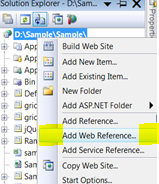
  Solution Right Click --- > Add Web Reference 


 3. Web Services in this solution 


4 . Use Web Services Solution Select --- >  SampleWebservices.asmx                   


5 .Add Refrences  Web Services Select [WebMethod] --- > Add Refrences                    

6 .Refrences  Web Services Page in Add--- >


 Call webservice in asp.net  :

  <div align="center">
        A :
        <asp:TextBox ID="txtA" runat="server"></asp:TextBox>
        <br />
        B :
        <asp:TextBox ID="txtB" runat="server"></asp:TextBox>
        <br />
        <asp:Button ID="btnAdd" runat="server" Text="Add" OnClick="btnAdd_Click" />
        <br />
        <span style="color:Red;font-weight:bold">ANS:</span>
        <asp:Label ID="lblAns" runat="server"></asp:Label>
    </div>

aspx CS:

protected void btnAdd_Click(object sender, EventArgs e)
    {

       int x, y, Ans;
         x =Convert.ToInt32(txtA.Text);
        y =Convert.ToInt32(txtB.Text);

//Add Webservices (Use This Webservices)
        SampleWebservices objWebServicesAdd = new     
                                                                               SampleWebservices();
        //objWebServicesAdd.Add(x,y);

        Ans = Convert.ToInt32(objWebServicesAdd.Add(x, y));
        lblAns.Text =Convert.ToString(Ans);
            
    }